Entertainment
Mastering the Recorder Instrument: A Beginner’s Guide


The recorder instrument is one of the most accessible and enjoyable instruments to learn. Whether you are a complete beginner or someone who has played other instruments before, mastering the recorder instrument is a rewarding journey.
What is the Recorder?
The recorder is a woodwind instrument that is often used in schools for music education. It is known for its simplicity and is one of the oldest instruments in the world, dating back to the Middle Ages.
The recorder is played by blowing air through a mouthpiece, and the sound is produced by the vibration of the air inside the instrument. It has a series of holes that are covered or uncovered by the fingers, which changes the pitch of the sound.
The recorder comes in different sizes, with the soprano recorder being the most common for beginners. Other types include the alto, tenor, and bass recorders, each offering different pitch ranges. Regardless of the type you choose, the basic principles of playing the recorder remain the same.
Parts of the Recorder
Before you start playing, it’s important to understand the different parts of the recorder. The recorder consists of three main parts:
Head Joint: This is the top part of the recorder, which includes the mouthpiece. When you blow into the mouthpiece, the air travels through the head joint and into the body of the instrument, creating sound.
Body: The body of the recorder contains the finger holes, which control the pitch of the notes. By covering or uncovering these holes with your fingers, you can play different notes.
Foot Joint: The foot joint is the bottom part of the recorder. It connects to the body and is used to adjust the length of the instrument, affecting the pitch.
How to Hold the Recorder
The first step in playing the recorder is to learn how to hold it correctly. Holding the recorder properly ensures that you can play comfortably and produce a clear sound. Here’s how you can hold the recorder:
Use Your Left Hand: Place your left thumb on the back of the recorder, and your other fingers on the top three finger holes. Your thumb will support the recorder while your fingers will control the pitch.
Use Your Right Hand: Place your right thumb underneath the recorder for additional support. Your other fingers should cover the remaining holes. Keep your fingers relaxed but firmly in place.
Position the Recorder: Hold the recorder at a slight angle, about 45 degrees from your body. This angle helps the air travel smoothly through the instrument.
Keep a Relaxed Posture: Ensure your shoulders are relaxed and your arms are at a comfortable level. Tension in your posture can affect the sound quality.
How to Play the Recorder
Playing the recorder is all about controlling your breath and finger placement. To start, here’s how to produce your first sound:
Position Your Lips: Place your lips gently over the mouthpiece. Don’t bite down or press too hard. Your lips should form a seal to allow the air to flow through the instrument.
Blow Gently: Take a deep breath and blow gently into the mouthpiece. Start with a soft breath and gradually increase the air pressure to make the sound louder.
Control Your Breath: The key to playing the recorder is controlling the airflow. Try to avoid blowing too hard or too softly. Your breath should be steady, as uneven airflow can result in a harsh sound.
Cover the Finger Holes: As you blow into the recorder, cover the finger holes with your fingers to produce different pitches. Start by covering the first few holes and gradually experiment with more fingerings as you progress.
Listen to Your Sound: Pay attention to the sound you produce. If it’s not clear, you may need to adjust your embouchure (mouth position) or the airflow.
Reading Music for the Recorder
Once you’ve mastered basic breath control and finger placement, it’s time to learn how to read music for the recorder. Music for the recorder is typically written in treble clef. Here are some basic things to know:
Notes and Fingerings: Each note corresponds to a specific combination of finger holes. For example, a full note may require covering all the holes, while higher notes may require fewer holes covered.
Rhythm: Understanding rhythm is essential for playing music. Notes are divided into different values, such as whole notes, half notes, quarter notes, etc. Each value indicates how long you should hold a note.
Time Signatures: The time signature tells you how many beats are in each measure and what note value receives one beat. For beginners, music with a 4/4 time signature is common.
Learning Simple Songs: Start with simple songs like “Twinkle, Twinkle Little Star” or “Mary Had a Little Lamb.” These songs are easy to play and will help you practice fingerings and rhythm.
Recorder Fingering Chart
A recorder fingering chart is a valuable tool for beginners. It shows the proper fingerings for different notes on the recorder. Each note corresponds to a specific combination of holes covered. Here’s a general guide to the fingerings:
- C (lowest note): Cover all holes.
- D: Cover all holes except the bottom hole.
- E: Cover all holes except the two bottom holes.
- F: Cover all holes except the three bottom holes.
- G: Cover the top hole only.
- A: No holes covered.
Refer to a recorder fingering chart as you practice, especially when learning new songs.
Improving Your Technique
As you continue to practice, you’ll want to improve your playing technique. Here are a few tips for getting better at the recorder:
Practice Regularly: Like any musical instrument, the key to improving is consistent practice. Start with 10-15 minutes per day and gradually increase your practice time as you progress.
Work on Breath Control: Breath control is crucial for playing the recorder. Try to control your breath so that the sound is smooth and consistent. Practice long, sustained notes to build your breath strength.
Improve Your Posture: Make sure you are sitting or standing up straight while playing. Poor posture can make it harder to play and may even cause discomfort or injury over time.
Use a Metronome: A metronome helps you stay in time while practicing. Start with a slow tempo and gradually increase the speed as you become more comfortable with the piece.
Record Yourself: Recording your playing can help you hear areas where you need improvement. It also allows you to track your progress over time.
Advanced Techniques
Once you are comfortable with the basics, you can move on to more advanced techniques, such as:
Vibrato: Vibrato is a slight variation in pitch that adds warmth to the sound. To produce vibrato on the recorder, you can control the air pressure by varying the intensity of your breath.
Fingering Variations: Advanced players often use different fingerings to create subtle changes in pitch or tone. This allows for more expressive playing and a wider range of musical possibilities.
Dynamics: Playing with dynamics means varying the loudness and softness of your playing. Experiment with playing loudly and softly, and try adding dynamic changes to your music for more emotion.
Common Challenges and How to Overcome Them
As with any instrument, learning the recorder can come with challenges. Some common problems beginners face include:
Producing a Clear Sound: If your sound is muffled or weak, check your embouchure and air pressure. Ensure your lips are relaxed, and avoid blowing too hard or too softly.
Finger Placement: Incorrect finger placement can result in flat or sharp notes. Make sure your fingers cover the holes completely and maintain a relaxed hand position.
Reading Music: Learning to read music can be difficult at first. Practice regularly, and take your time to memorize the notes and rhythms.


The education system Class 20x has changed dramatically over the last few years, and learners today are no longer satisfied with traditional classroom methods that rely only on books, chalkboards, and memorization. Students now wantely demand interactive, flexible, and technology-supported learning experiences that match the pace of modern life. This is where Class 20x comes into the picture as a modern concept that focuses on future-ready learning, smarter teaching methods, and better student engagement. The purpose of Class 20x is not only to improve learning outcomes but also to create a learning environment where students feel motivated, confident, and prepared for real-world challenges.
Class 20x is not just a trend or a simple educational term. It represents a complete shift in how learning can be delivered, managed, and experienced. Instead of one-way teaching where students only listen, Class 20x encourages two-way interaction where students participate, collaborate, and actively build skills. It promotes creativity, critical thinking, and the use of modern tools that help students learn faster and retain knowledge better. The main reason why Class 20x is gaining attention is because it offers an educational approach that is aligned with the future job market, digital skills, and global competition.
The Core Idea Behind Class 20x Learning
The concept of Class 20x is built around improving the quality of learning by combining smart education strategies with technology and personalized learning methods. Traditional classrooms usually treat every student the same, but Class 20x supports the idea that every student learns differently. Some students understand concepts quickly through visuals, some prefer reading, while others learn best through practice and repetition. Class 20x aims to create an educational environment that supports all these learning styles in a balanced and effective way.
In Class 20x, learning becomes more student-focused instead of teacher-focused. The teacher still plays a major role, but more as a guide and mentor rather than the only source of knowledge. This approach helps students develop independence and confidence in their abilities. It also prepares them for real-life situations where they must solve problems, think logically, and make decisions. The real strength of Class 20x is that it makes education more meaningful by connecting learning topics with real-world applications.
How Class 20x Supports Future Skills
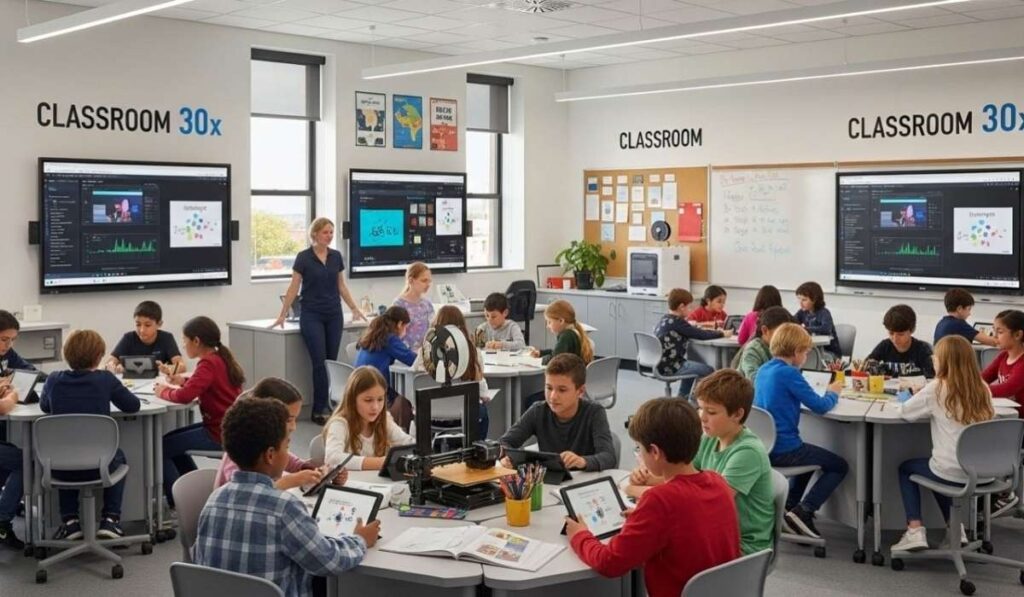
One of the strongest benefits of Class 20x is its focus on building future-ready skills that students need for modern careers. Today, companies and industries are not only looking for degrees but also for skills such as communication, problem-solving, teamwork, and digital literacy. Class 20x focuses on these abilities by making learning more interactive and practical. Students are encouraged to ask questions, research solutions, work on projects, and collaborate with classmates. This type of learning helps students gain confidence and prepares them for competitive environments.
Class 20x also supports technology-based learning, which is extremely important in the modern world. From artificial intelligence to online workspaces, almost every field today requires basic digital knowledge. Students who study in a Class 20x environment become more comfortable with online learning tools, smart apps, educational platforms, and interactive resources. This helps them become better prepared for both academic growth and career development. The system is designed to make students adaptable, which is one of the most valuable skills in today’s fast-changing world.
Class 20x and the Role of Technology in Education
Technology plays a major role in the structure of Class 20x, but it is not just about using laptops or tablets in the classroom. The real purpose of technology in Class 20x is to make learning easier, faster, and more engaging. Students can access online notes, interactive videos, digital assignments, and learning platforms that allow them to revise topics anytime. This removes the limitation of time and location, making education more flexible and effective.
Another important advantage of Class 20x is that it supports smart assessment methods. Instead of relying only on exams and written tests, students can be evaluated through quizzes, presentations, project work, and practical performance. Technology helps teachers track student progress, identify weak areas, and provide customized guidance. This creates a stronger learning system where students are not left behind. With Class 20x, education becomes more organized, measurable, and focused on actual improvement rather than only grades.
Personalized Learning in Class 20x

A major highlight of Class 20x is personalized learning, which means students can learn at their own pace and in a way that suits them best. Traditional classrooms often move at one speed, and students who struggle may feel pressured while fast learners may feel bored. Class 20x solves this problem by allowing flexible learning paths where students can focus more on topics they find difficult and move faster through topics they already understand. This helps students build stronger confidence and reduces academic stress.
Personalized learning in Class 20x also supports better student-teacher interaction. Teachers can guide students based on their individual performance and provide support in a targeted way. This approach improves learning efficiency because students are not wasting time on content they already know well. Instead, they spend more time improving weaker areas. Over time, this builds a stronger foundation of knowledge and skills, making students more prepared for higher studies and professional success.
Class 20x and Student Engagement
One of the biggest challenges in education is student engagement, because many students lose interest when lessons feel boring or repetitive. Class 20x focuses heavily on engagement by making learning more interactive and enjoyable. Students are encouraged to participate in discussions, group projects, creative tasks, and practical activities. This makes the classroom environment more active and energetic. Instead of simply memorizing information, students learn by doing, which improves understanding and retention.
Class 20x also promotes creativity and curiosity. Students are motivated to explore new topics, ask questions, and think beyond textbooks. This helps develop a mindset of innovation, which is extremely important for future careers. When students enjoy learning, they perform better and develop a positive attitude toward education. This is why Class 20x is considered a modern learning approach that is designed for the next generation. It transforms learning from a forced activity into a meaningful experience.
The Teacher’s Role in Class 20x

In Class 20x, teachers are not replaced by technology, but their role becomes more powerful and strategic. Teachers become mentors who guide students, support them, and help them discover knowledge instead of simply delivering lectures. This improves the teacher-student relationship and makes learning more comfortable. Students feel more confident in asking questions, discussing problems, and sharing ideas because the classroom environment becomes supportive rather than strict.
Teachers in Class 20x also focus on improving learning outcomes through modern methods. They can use digital tools, interactive resources, and real-world examples to make lessons more interesting. They can also analyze student performance using smart systems and provide targeted improvement plans. This makes education more efficient and reduces the gap between weak and strong students. The teacher remains the heart of the learning system, but Class 20x gives them better tools and smarter strategies to improve student success.
Benefits of Class 20x for Students
The benefits of Class 20x are wide and impactful, especially for students who want to improve their academic performance while also building future skills. One of the biggest advantages is that students become more independent learners. They learn how to research topics, solve problems, and manage their studies effectively. This builds discipline and responsibility, which helps them throughout life.
Class 20x also improves confidence because students become active participants rather than silent listeners. They learn how to express ideas, communicate better, and work in teams. These skills are extremely valuable in real-world environments where collaboration is necessary. Another major benefit is that students gain stronger digital literacy. Since Class 20x integrates technology into learning, students become comfortable with modern tools, making them more prepared for future careers. Overall, Class 20x helps students become smarter, more capable, and more competitive in both education and life.
Why Class 20x is Important for Modern Education Systems

Education systems across the world are under pressure to modernize because traditional learning methods are no longer enough for today’s needs. Class 20x is important because it supports a learning model that matches modern requirements. It focuses on skill development, digital learning, and flexible education that supports both academic excellence and real-world preparation. This approach is especially useful in a world where technology is evolving rapidly and industries require constant learning and adaptation.
Class 20x also supports a more balanced educational environment by reducing stress and increasing learning efficiency. Students are not forced into one strict system, but instead are supported through interactive and personalized learning methods. This helps students learn better without feeling overwhelmed. For education systems, adopting Class 20x can improve overall student performance, raise engagement levels, and create a generation of learners who are more prepared for global competition. That is why Class 20x is becoming a highly relevant topic in modern education discussions.
The Future Scope of Class 20x
The future of education will continue to shift toward digital and interactive learning environments, and Class 20x is likely to play a major role in shaping this transformation. As technology becomes more advanced, classrooms will include smarter tools such as artificial intelligence learning systems, virtual classrooms, digital assignments, and real-time performance tracking. Class 20x aligns perfectly with this direction because it already supports innovation and modern learning approaches.
In the coming years, Class 20x can become a standard model for schools and institutions that want to improve their teaching quality. It can also help bridge the gap between traditional education and career-based learning. Students who learn through Class 20x will have a stronger advantage because they will not only have academic knowledge but also practical skills, communication ability, and confidence. This makes Class 20x a long-term educational solution rather than a temporary trend. It represents the future of learning where education becomes smarter, faster, and more meaningful.
Final Thoughts on Class 20x
In conclusion, Class 20x is a powerful and modern learning concept that focuses on preparing students for the future through interactive education, technology integration, personalized learning, and skill development. It is designed to solve many problems of traditional education such as lack of engagement, one-speed learning, and outdated teaching methods. Class 20x encourages students to become active learners who can think critically, communicate effectively, and adapt to modern challenges.
As the world becomes more digital and competitive, education must also evolve to meet new demands. Class 20x provides a strong foundation for modern education systems by promoting smarter learning methods and future-focused skills. Whether it is improving student engagement, enhancing teaching methods, or building digital confidence, Class 20x plays an important role in shaping tomorrow’s learners.
FAQs
1. What is Class 20x?
- Class 20x is a modern learning concept that focuses on interactive, technology-based, and future-ready education.
2. How does Class 20x improve student learning?
- Class 20x improves learning by using personalized methods, digital tools, and better student engagement strategies.
3. Is Class 20x suitable for all students?
- Yes, Class 20x supports different learning styles, making it useful for both slow and fast learners.
4. What role does technology play in Class 20x?
- Technology in Class 20x helps students access smart learning resources, digital content, and performance tracking systems.
5. Why is Class 20x considered future-ready learning?
- Class 20x builds critical thinking, communication, and digital skills that students need for future careers.

Corpenpelloz is a term that has recently gained attention across different online communities, business environments, and digital systems. Many people hear the word Corpenpelloz and instantly assume it is a tool, a system, or a specific platform. In reality, Corpenpelloz is more than just a simple concept. It is often used as a structured method that helps individuals and organizations manage tasks, improve efficiency, and create better outcomes in both personal and professional work. Because Corpenpelloz is flexible and can be applied in multiple industries, it has become an increasingly valuable concept for those who want to simplify complicated processes while still maintaining high performance.
What makes Corpenpelloz unique is that it is not limited to one field. Some users apply Corpenpelloz in productivity planning, while others use it for workflow management, project coordination, digital organization, and performance optimization. The reason Corpenpelloz has gained popularity is simple: modern systems are overloaded with information, tasks, deadlines, and constant changes. People need a reliable approach that allows them to stay organized, reduce mistakes, and maintain consistent progress. Corpenpelloz is often described as a practical solution that helps users stay focused while building a structured path toward success.
What is Corpenpelloz and Why is It Important?
Corpenpelloz can be understood as a system of structured planning and effective execution. It focuses on simplifying tasks and creating a repeatable process that can be improved over time. Instead of handling work in a random or unorganized way, Corpenpelloz promotes the idea of breaking down tasks into manageable parts, setting priorities, and tracking progress in a clear manner. This structured approach makes Corpenpelloz extremely useful for individuals who struggle with time management or organizations that want to improve team efficiency.
The importance of Corpenpelloz comes from the way it reduces confusion. Many people waste valuable time because they do not have a clear plan or because they constantly switch between tasks without finishing anything properly. Corpenpelloz helps solve this issue by providing a method to organize work step by step. When applied correctly, Corpenpelloz improves productivity, reduces errors, and ensures that work is completed with better accuracy. This is why Corpenpelloz is often linked with efficiency, focus, and performance improvement.
The Core Concept Behind Corpenpelloz
The main concept behind Corpenpelloz is structure and consistency. Instead of relying on motivation or random planning, Corpenpelloz relies on clear steps that can be followed repeatedly. It encourages users to define objectives, break them into smaller tasks, allocate resources properly, and evaluate results. This creates a cycle of continuous improvement where each project becomes easier and more effective than the last.
Corpenpelloz is also designed to be adaptable. Not every person works the same way, and not every business has the same workflow. That is why Corpenpelloz can be adjusted according to specific needs. Some people may apply Corpenpelloz in a strict manner using digital tools and templates, while others may use a simplified version through daily planning and checklists. The key point is that Corpenpelloz is a flexible method that supports organization, planning, and better execution.
How Corpenpelloz Works in Real-Life Situations
In real life, Corpenpelloz works by creating a clear roadmap for tasks and projects. For example, if someone is working on a business project, Corpenpelloz would involve identifying the main goal, dividing the work into smaller parts, assigning deadlines, and tracking progress regularly. This ensures that the project moves forward smoothly without unnecessary delays. Many professionals prefer Corpenpelloz because it helps them stay in control even when tasks become complex.
Corpenpelloz is also useful for individuals managing personal responsibilities. Whether it is studying, fitness planning, learning a new skill, or managing daily routines, Corpenpelloz helps people build structure into their lives. The reason Corpenpelloz works effectively is because it prevents overwhelm. Instead of seeing a large goal as impossible, users break it into smaller actions. Over time, these small actions lead to significant progress.
The Main Benefits of Using Corpenpelloz

One of the biggest benefits of Corpenpelloz is that it saves time. When tasks are organized properly, less time is wasted on confusion, unnecessary repetition, or poor planning. Corpenpelloz helps users focus on what matters most by prioritizing tasks and removing distractions. This means productivity increases without requiring extra effort.
Another major benefit of Corpenpelloz is improved accuracy. Many mistakes happen because people rush through work or forget important steps. Corpenpelloz promotes a systematic approach where tasks are reviewed and tracked. This reduces the chance of missing details. Additionally, Corpenpelloz supports better decision-making because it provides clarity. When everything is organized, it becomes easier to identify problems and find solutions quickly. Over time, Corpenpelloz can help users develop stronger discipline, improved work habits, and better long-term results.
Why Corpenpelloz is Becoming More Popular
The rise of digital work and online business has created an environment where people handle multiple responsibilities at once. Remote jobs, freelancing, online education, and e-commerce all require strong organization skills. This is where Corpenpelloz becomes extremely useful. Many people are now looking for structured methods that allow them to manage work without stress. Corpenpelloz fits this need because it is not overly complicated but still powerful enough to handle large tasks.
Another reason Corpenpelloz is gaining popularity is because of the demand for productivity frameworks. People are constantly searching for systems that help them improve performance. Corpenpelloz is seen as a modern approach that supports efficiency and planning. It provides a structured path without being too strict or limiting. Because of this balance, Corpenpelloz is being adopted by professionals, students, business owners, and even creative individuals who want to manage their ideas and projects more effectively.
How to Start Using Corpenpelloz Effectively

To start using Corpenpelloz effectively, the first step is understanding your objective. Corpenpelloz works best when you have a clear goal. Whether you want to complete a project, improve your daily routine, or manage a business workflow, you must define what you want to achieve. Once the goal is clear, Corpenpelloz encourages you to break it down into smaller actions. These smaller actions become manageable tasks that are easier to complete.
After breaking tasks down, Corpenpelloz requires prioritization. Not all tasks have the same value. Some tasks create the biggest impact, while others can be delayed. Corpenpelloz helps you identify which actions should be completed first. Once priorities are set, the next step is scheduling and tracking. Corpenpelloz works best when tasks are tracked consistently. This can be done using a notebook, a spreadsheet, or digital productivity tools. The key is consistency, because Corpenpelloz is designed to build long-term discipline rather than short-term motivation.
Best Practices to Maximize Corpenpelloz Results
One of the best practices for Corpenpelloz is maintaining a routine. Corpenpelloz works best when you follow a consistent schedule and review your progress regularly. Many users make the mistake of applying Corpenpelloz only when they feel motivated. However, the true strength of Corpenpelloz is that it creates stability. Even on difficult days, the system keeps you moving forward.
Another important practice is evaluation. Corpenpelloz is not only about planning but also about improvement. After completing tasks, you should review the process and identify what worked well and what needs adjustment. This makes Corpenpelloz a self-improving framework. Over time, the system becomes more effective because you learn from mistakes and optimize your workflow. It is also recommended to keep Corpenpelloz simple at the beginning. Many beginners overcomplicate it by adding too many rules. The best approach is to start small, build consistency, and then expand the system gradually.
Common Mistakes People Make with Corpenpelloz

One common mistake with Corpenpelloz is unrealistic planning. Some users create overly detailed schedules that are impossible to follow. When they fail to meet these schedules, they lose motivation and abandon the system. Corpenpelloz should be realistic. It is better to plan fewer tasks and complete them consistently than to plan too much and fail.
Another mistake is ignoring flexibility. While Corpenpelloz is structured, it should not be rigid. Life changes, emergencies happen, and priorities shift. Corpenpelloz works best when it can adapt. If a plan fails, it does not mean Corpenpelloz is ineffective. It simply means adjustments are needed. Another mistake is failing to track progress. Without tracking, Corpenpelloz loses its power because the user cannot measure improvement. Tracking provides clarity, motivation, and direction, which are essential for long-term success.
Corpenpelloz for Business Growth and Productivity
Corpenpelloz is extremely effective for business environments because it supports structured workflows. Businesses often deal with multiple departments, deadlines, and complex operations. Without a proper system, productivity suffers and mistakes increase. Corpenpelloz helps businesses improve coordination by creating clear processes and responsibilities. When teams follow Corpenpelloz, tasks become more organized and communication becomes more effective.
Corpenpelloz is also useful for entrepreneurs and freelancers. Managing clients, deadlines, and personal productivity can be overwhelming. Corpenpelloz helps by providing a framework for managing workload efficiently. Entrepreneurs who apply Corpenpelloz often find it easier to scale their operations because they can replicate systems instead of starting from scratch every time. This makes Corpenpelloz valuable not only for productivity but also for long-term business growth.
Corpenpelloz for Students and Personal Development
Students can benefit greatly from Corpenpelloz because it supports better learning habits. Many students struggle with time management and procrastination. Corpenpelloz helps students break study material into smaller parts, schedule revision sessions, and track progress over time. This reduces stress and improves academic performance. Instead of studying randomly, Corpenpelloz encourages structured preparation.
For personal development, Corpenpelloz can be applied to fitness, skill-building, and lifestyle improvement. People often fail at personal goals because they do not have a clear plan. Corpenpelloz solves this by turning big goals into small actions. For example, someone wanting to improve health can apply Corpenpelloz by setting a workout schedule, tracking nutrition, and reviewing progress weekly. Over time, these small improvements create lasting change.
How Corpenpelloz Improves Long-Term Success
Corpenpelloz is not just a short-term productivity hack. It is a long-term system that helps users develop habits and discipline. The reason Corpenpelloz supports long-term success is because it encourages consistency. Many people fail because they rely on motivation, which is temporary. Corpenpelloz replaces motivation with structured action. Even when motivation is low, the system continues to work because it is built on habits.
Corpenpelloz also helps users stay focused on progress rather than perfection. Many people quit because they want instant results. Corpenpelloz teaches the value of gradual improvement. Over time, the small consistent actions produce large outcomes. This is why Corpenpelloz is often associated with sustainable success. Whether it is personal goals, academic achievement, or business growth, Corpenpelloz creates a structured foundation that supports long-term results.
The Future Potential of Corpenpelloz
As technology continues to evolve, the importance of structured productivity systems will increase. Corpenpelloz is likely to become even more relevant as people face higher workloads, faster communication, and greater competition. Modern workplaces require efficiency, and Corpenpelloz offers a method to maintain productivity without burnout. This is why many experts see Corpenpelloz as a valuable approach for the future.
The future potential of Corpenpelloz also lies in its adaptability. Since it can be used in different industries, it has the ability to evolve with changing demands. Whether Corpenpelloz is applied in business systems, education, personal development, or digital organization, its core purpose remains the same: improving performance through structure. As more people discover Corpenpelloz, it is likely to become a recognized method for achieving better productivity and efficiency in both professional and personal life.
Final Thoughts on Corpenpelloz
Corpenpelloz is a powerful concept that can help individuals and organizations achieve better results through structured planning, clear priorities, and consistent execution. The value of Corpenpelloz comes from its simplicity and flexibility. It does not require advanced tools or complicated systems, but it can still produce significant improvements when applied correctly. Whether you are a student, entrepreneur, business professional, or someone working on personal growth, Corpenpelloz can provide a reliable framework to reduce confusion, improve productivity, and build long-term success.
FAQs
1. What is Corpenpelloz mainly used for?
- Corpenpelloz is mainly used for improving productivity, organization, and workflow efficiency.
2. Is Corpenpelloz suitable for beginners?
- Yes, Corpenpelloz is beginner-friendly because it is simple and easy to apply.
3. Can Corpenpelloz help businesses grow?
- Yes, Corpenpelloz supports better planning, teamwork, and scalable business operations.
4. Does Corpenpelloz require any special tools?
- No, Corpenpelloz can be applied using basic tools like notes, spreadsheets, or apps.
5. Why is Corpenpelloz becoming popular?
- Corpenpelloz is becoming popular because it helps people manage complex tasks in a structured way.

Coomer Zone is a term that has gained traction in various online communities, often associated with explicit adult content and niche internet subcultures. The website, along with its related platforms, has become a focal point for discussions about internet safety, privacy, and online behavioral patterns. The term “coomer” itself generally refers to someone who excessively consumes adult content, often to the point of addiction, which makes the platform controversial. Coomer Zone, as a website, caters to this audience by offering a variety of content that can be potentially harmful if not used responsibly. Understanding the dynamics of Coomer Zone requires examining both the cultural phenomenon and the technological aspects behind it.
The popularity of Coomer Zone can be attributed to the anonymity the internet provides. Many users are drawn to the website because it allows them to explore content they might feel uncomfortable accessing elsewhere. This has created a subculture where discussions about habits, preferences, and online behaviors thrive. While some argue that Coomer Zone simply provides entertainment, others highlight the risks of exposure to addictive content and the potential impact on mental health. It’s important for users to approach such websites with caution, understanding both the benefits and the pitfalls.
The Content and Features of Coomer Zone
Coomer Zone offers a range of content designed to cater to its specific audience. The site typically includes adult videos, images, forums, and sometimes interactive features. Its layout is often designed to maximize engagement, encouraging users to spend more time on the platform. While this might be appealing to some, it also raises concerns regarding addiction and time management. Many experts warn that websites like Coomer Zone can lead to compulsive behavior, particularly in younger audiences who may not yet have the tools to self-regulate their internet usage.
Apart from entertainment, Coomer Zone also provides social interaction through forums and discussion threads. Users often share tips, experiences, and content recommendations. While this social element can foster a sense of community, it also increases exposure to potentially harmful discussions. Furthermore, the sharing of personal information, even indirectly, can pose significant privacy risks. Understanding the features of Coomer Zone is crucial for assessing both its appeal and its dangers, especially for parents, educators, and those concerned with online safety.
Website Risks and Security Concerns

One of the main concerns surrounding Coomer Zone is the security of the website itself. Being a platform that hosts adult content, it is often targeted by hackers and malicious actors. Users accessing Coomer Zone may encounter malware, phishing attempts, or intrusive advertisements that compromise their personal devices. Cybersecurity experts advise that visiting such websites without proper protection, such as antivirus software or VPNs, can expose sensitive information, including passwords and financial data. Additionally, the lack of strict moderation on some sections of Coomer Zone can increase the risk of encountering inappropriate or illegal content.
Another risk associated with Coomer Zone is the potential for account breaches or data leaks. Users who register for forums or interactive features might unknowingly provide personal details that could be exploited. Even anonymous interactions can have consequences if users share identifying information through images, usernames, or posts. It’s essential for anyone considering using Coomer Zone to understand these risks and take proactive steps to safeguard their privacy and security online.
Safety Tips for Users
Safety on Coomer Zone involves both technical measures and behavioral practices. From a technical standpoint, using a secure device, updating software regularly, and employing VPNs or ad blockers can reduce exposure to malware and invasive advertisements. Users should also be cautious about sharing personal information or engaging in discussions that reveal sensitive details. Online anonymity can be a double-edged sword; while it protects identity, it can also encourage risky behavior if users feel overly secure.
Behavioral safety is equally important. Limiting time spent on Coomer Zone, setting personal boundaries, and being mindful of the type of content consumed can prevent addictive patterns. Mental health specialists often recommend monitoring one’s own usage and seeking help if content consumption begins to interfere with daily life. By combining technical safeguards with responsible behavior, users can reduce the potential harm associated with Coomer Zone.
Legal Considerations

The legal status of Coomer Zone can vary depending on geographic location and the specific content accessed. In many countries, distributing or viewing certain types of adult content, especially involving minors, is illegal. Users must be aware that engaging in illegal activities on the website can lead to severe penalties. Moreover, some countries impose restrictions on adult content websites in general, which might result in blocked access or fines for users attempting to bypass these regulations.
It’s also worth noting that Coomer Zone, like other adult platforms, may have terms of service that users must adhere to. Violating these terms can result in account suspension or permanent bans. Legal awareness is critical for anyone interacting with Coomer Zone, as ignorance of the law is rarely considered a valid defense. Users should educate themselves about local regulations and always approach the site with caution to avoid unintended legal consequences.
The Psychological Impact
Excessive use of Coomer Zone can have psychological implications. Studies indicate that compulsive consumption of adult content may affect brain chemistry, leading to dopamine desensitization and reduced sensitivity to real-life intimacy. Users may experience increased anxiety, depression, or social isolation as a result of prolonged engagement with such content. Awareness of these risks is vital, particularly for younger audiences who may not fully understand the long-term impact of their online habits.
Psychologists also highlight the potential for behavioral conditioning through Coomer Zone. Repeated exposure to specific types of content can create unrealistic expectations and distort perceptions of relationships or intimacy. This underscores the importance of moderation and self-awareness. Understanding the psychological impact can empower users to make informed choices, seek support if needed, and maintain a healthy relationship with digital media.
Community and Cultural Relevance

Coomer Zone has carved out a unique space in internet culture. Despite the controversies surrounding it, the website has influenced memes, discussions, and even social commentary about adult content consumption. It serves as a case study in digital anthropology, illustrating how niche communities form around shared interests. The platform’s cultural relevance cannot be ignored, as it reflects broader trends in media consumption, anonymity, and internet-driven social dynamics.
Engaging with Coomer Zone responsibly can also provide insight into online behavior patterns. Researchers and social commentators often analyze such websites to understand user motivations, online addiction trends, and the evolution of digital communities. Recognizing its cultural role helps contextualize the website’s existence while reinforcing the need for safe and informed usage.
Alternatives and Safer Options
For users seeking content similar to what Coomer Zone offers but with safer options, several alternatives exist. Platforms with stricter moderation, verified content, and enhanced security measures provide a more controlled environment. Additionally, mental health-oriented platforms and educational resources can help individuals understand their behaviors without the risks associated with Coomer Zone. Exploring safer alternatives ensures that users can engage with online content without compromising privacy, security, or psychological well-being.
Choosing alternatives also involves understanding the type of content and interaction one is seeking. For those interested in adult entertainment, verified platforms reduce the risk of encountering illegal or unsafe material. For those looking to explore online communities, forums with clear guidelines and active moderation provide a safer space for discussion. Evaluating these options helps maintain a balance between online engagement and personal safety.
Impact on Society and Youth

Coomer Zone’s influence extends beyond individual users, affecting societal perceptions of adult content consumption. Increased accessibility to explicit material has sparked debates about media responsibility, ethical content distribution, and the protection of minors online. Parents, educators, and policymakers are increasingly concerned about how exposure to websites like Coomer Zone shapes behavior, expectations, and social interactions among younger audiences.
Society must consider the balance between freedom of expression and protection against exploitation or harm. Awareness campaigns, parental guidance, and policy enforcement are essential tools to mitigate the negative effects while preserving responsible access for adults. Understanding Coomer Zone within this broader social context highlights the complexities of digital media ethics and the need for informed engagement.
Conclusion and Final Thoughts
Coomer Zone represents a multifaceted phenomenon in the online world, blending entertainment, social interaction, and digital culture. While it offers content that appeals to a specific audience, the associated risks—including security threats, legal concerns, and psychological impacts—cannot be overlooked. Responsible use, awareness of safety measures, and legal knowledge are essential for anyone interacting with the platform. By understanding its content, community, and potential consequences, users can navigate Coomer Zone in a more informed and cautious manner.
Frequently Asked Questions
1. What is Coomer Zone?
- Coomer Zone is a website primarily focused on adult content and online communities.
2. Is Coomer Zone safe to use?
- Use caution, employ VPNs, and avoid sharing personal info to enhance safety.
3. Can Coomer Zone be illegal?
- Accessing illegal content or violating local laws while using it is punishable.
4. Does Coomer Zone affect mental health?
- Excessive use can cause addiction, anxiety, and social isolation.
5. Are there safer alternatives to Coomer Zone?
- Yes, verified adult platforms and moderated communities offer safer engagement.

The Journey of Skyla Brae Kelley: From Aspiring Artist to Rising Star

Annabel Wright: The Rising Star in the World of Fashion

Who is Kristi Branim Fox?

5StarsStocks.com Military: The Future of Strategic Military Investments

Sharon Summerall and Don Henley: A Rock and Romance Story

Lillian Jean Cornell: Age, Family, & Bio
-

 Celebrity21 hours ago
Who is Kid Rock married to now: A look into his current relationship status
-

 Celebrity20 hours ago
Lisa Dillon: A Rising Star in the Acting World
-

 Celebrity20 hours ago
Discover the Story Behind AJ Styles’ Wife
-

 Celebrity20 hours ago
Discovering the Truth Behind Phil Wickham’s Net Worth
-

 Celebrity20 hours ago
The Best Facebook Video Download Apps: Everything You Need to Know
-

 Celebrity21 hours ago
The iconic relationship of Dennis Quaid and Meg Ryan
-

 Celebrity21 hours ago
Explore the Benefits of Using GreetingsIsland for Your Greeting Cards
-

 Celebrity20 hours ago
Who is Phylicia Rashad’s Husband?